New Videos from Youtube

How To Add Border To Post Titles

Add Border To Post Titles in Blogger: Let's play with CSS and change the border of post titles in Blogger.You may have noticed the blog titles comes with "text-decoration:none" by default , in simple words no style is applied to the titles of the Blog Posts.Actually we can change the post titles and can decorate it with different CSS properties but here we gonna apply the border ! Border can be "groove" , "Solid" , "dashed" , or "dotted" having a specific color code and number of pixels.Don't confuse , it is as easy as eating cake.
How To Add Border To Post Titles

How To Add Border To Post Titles

  • Go To Blogger Dashboard
  • Click On Template
  • EDIT HTML
  • Search for post-title or .post or only "post"
  • Search until you find the selector "Post Title" as shown below

 
  • Look at the above snapshot i added there the border Property i.e "border:groove 1px and color" Change these values to your desired values and save the template.You can even change the color of the post title just by simply changing the color code of "COLOR" property in the above script.
  • However here we have selected the border color Groove having gray color and width 1pixel.
  •  That's it !!
 Note : In many templates the POST TITLE Selector is .post-title but if you can't find or if this selector is not available then you have to find the exact and matchable selector i.e the selector which matches with the class or ID defined in the div tags! 
 
What's Up : Actually this hack will add a gray color border to all the post titles having 1 pixel width ,actually it adds 5 stars to the beauty and style of template.It has no effect on blog loading speed.Stay Blessed ,Happy Blogging!


Premium And SEO Optimized Blogger Templates

You may have the Best Content in the World , and the most significant audience and even a flood of traffic from Social Medias.But if Search Engine is not crawling your website/blog then that traffic and Contents is just a waste.The Time You Leave Sharing Your blog on Social Media or If You Stop posting for a week , you will lose all your traffic and you will sit idle , and will yell now What To Do? So To get rid of this Problem You have to do SEO for your Blog/website , Now How to Do SEO ? Is it a big thing? Yeah , it's really a Big thing , in order to get rid of implementation of SEO you can just use SEO Optimized Template which is worth then Just Posting and According to Quote " Something is better then Nothing" . So If you can't Do SEO for Your Blog or Can't hire an Expert so just Change Your Template to SEO Optimized Template.It will helps you to get lil bit traffic from Search Engines.Here we have collect a Collection of Premium and SEO Optimized Blogger Templates , and we hope you will love these templates.
 

Features

  • SEO Optimized 
  • Professional
  • Ads Ready
  • Premium 
  • Works with all Browsers
  • Many Cutomized Widgets
  • Responsive , Magazine , and Gallery Designs
  • Awesome backgrounds and Colors Combinations

  Premium And SEO Optimized Blogger Templates 

Here is the best Collection of SEO Optimized Blogger Templates , as we already mentioned these templates are SEO Ready and having the best features and Customized widgets.We hope you will find these templates interesting , must share it with your friends !

 Maggner Magazine Blogger Template

Smartify Blogger Template

Professional Blogging Blogger Template 

Magzon Blogger Template 

Green SEO Blogger Template

Pro Gray Blogger Template

Metro Minimalist Blogger Template

SEO-Friendly Blogger Template

Yaminth Blogger Template

 GoGreen Blogger Template

How To Speedup utorrent Speed from 2KBPS to 4MBPS

utorrentSpeedup µTorrent Speed from 2KBPS to 4MBPS: µTorrent is the ever best software for downloading movies,softwares , games and extra stuff ! Actually µTorrent was developed by BitTorrent Inc, and firstly it was released in September 18, 2005.According to sources it is available in 67 languages.µTorrent is available for Microsoft Windows, Mac OS X, Linux, and Android! Moreover it is written in C++, oh we are going some where else , it was just a lil bit info about µTorrent.Actually if you download µTorrent and start downloading some stuff , it has very slow downloading speed .But Today we will share an awesome trick which will help you to Speedup µTorrent Speed from 2KBPS to 4 MBPS.Now If you are interested in Learning "How To Speedup Utorrent Speed from 2KBPS to 4MBPS" .Watch the Video tutorial below.

Features Of UTorrent

  • Streaming of video torrents
  • Resume Capability :  It's Pakistan , Yeah Every hour Light gets off , But Don't worry µTorrent is the software which has awesome resume capability , It will automatically resume your Download when you on your PC.
  • It Supports Teredo tunneling / IPv6 !
  • Embedded Tracker
  • HTTPS Tracker Support 
  • Available in 67 Languages
  • Size is 1.5 Mega Byte 
  • Full proxy server support
  • And many Awesome Features
 You may Also like : Create Your OWN Facebook Timeline Covers

    Download Utorrent

    Video Tutorial

    Mintify Magazine Blogger Template

     Mintify Magazine Blogger Template :  Bringing the New fantastic and incrdible magazine style blogger for you !! That is What we called "Mintify Magazine Blogger Template".This template is just recently launched by Templateify , which is really a rare and magnificent template.Due to its magazine style and floating header this template become more impressive and inspiring.Onr Right Side-bar along with beautiful drop down menu.

    Informations about Mintify Magazine Blogger Template

    • Template Name : Mintify Magazine Blogger Template 
    • Author : Templateify
    • Style Of Template : Magazine
    • Template Release Date : 17 September 2013
     

    Features of Mintify Magazine Blogger Template

    • Professional and stylish Look
    • Floating Header
    • Customized Widgets
    • Works with all browsers
    • White
    • Magazine Style
    • One Right Sidebar
    • 4 Columns Footer
    • 3 Columns Layout
    • Stunning Design

    Add Divider(line) Between Posts in Blogger

    Another interesting Hack for Blogger is How To Add Divider Between The Blogger Posts?Adding Divider between the posts is nothing else it will just add an image which will clarify the posts i.e One can easily navigate any post.Actually by default Blogger template has a Line which divides the post but isn't that Looking Bore? Of Course its Boring then don't waste your time,this is the time to make your Blog Creative and Attractive.

    First Of all you have to find a Picture which you want to use as a divider e.g in Our Case we have the below image which we will use to add divider b/w the Posts.
    You can host your Divider image in any hosting such as tinpic or Photo Bucket etc.

    How To Add Divider(line) Between Posts in Blogger

    • Go To Blogger Dashboard >> Template >> Edit HTML
    • Search for this Code
    .post { margin:.5em 0 1.5em; border-bottom:1px dotted $bordercolor; padding-bottom:1.5em; }

    • Now Replace the Above Code with The Below Script and if you are interested in Changing the divider image just change the URL and Do This Step

    .post {
    background: url(http://i36.tinypic.com/xqid55.jpg);
    background-repeat: no-repeat;
    background-position: bottom center;
    margin:.5em 0 1.5em;
    border-bottom:0px dotted $bordercolor;
    padding-bottom:3.6em;
    }

    •  Replace the Red URL mentioned with your Own Divider image url
    • If you want to Change "Padding-Bottom" increase or decrease the value in Black Bold Script

    2nd Method For Adding Divider Between Posts in Blogger

    If The Above Method is not working in your Template,then you have to use this method which is very easy !
    • Go To Blogger Dashboard
    • Click on Template
    • Edit HTML
    • Now Search for the below Script

    • Now Copy the below Script and Add it below the above Script
     
    Tip:- If you want to increase the Divider height Change 30 to the Desired value,and Add Divider image url in the script and that's it!

    So What's Up:- This was an awesome trick,it is ideal for bloggers to add this divider image between the posts.It will help their visitors to easily navigate the blogging contents.Share your ideas with us , stay Blessed Happy Blogging!

    How To Add 5 Star Rating Widget To Blogger


    Getting positive feedback from visitors and blog readers enable you to get fame.The Stronger your feedback is the more your blog visitors will be happy.5 Start Rating Widget is an awesome source of getting feedback and Positive response from your readers,this widget show 5 stars at the top or below the blog post,where one can rate your blog article.This Widget also show the total number of views of the article along with the number of votes.You can rate an article by Selecting and Clicking the 5 stars at Once.Actually this Blog has no effect on Blog Loading Speed.

    How To Add 5 Star Rating Widget To Blogger


    • First of all Go To Blogger Dashboard
    • Then Click On Template >> Edit HTML
    • Now search for tag
    • After Finding the Head Tag Copy the below Script and paste it just above it or before it.


    • After Implementing the above steps search for this Code  
    • Now Copy the Below Code and paste it just above/below


    ,
    Rate this posting:
    {[['<img src="http://static.graddit.com/img/star.png"/>']]}

    • Hit Save Template and that's it 

    Important to Note

    This Widget Provide two option i.e you want to show it before Blog Post or below Blog Post,Actually i will prefer the below section because when readers read your article at the end they decide how was the article.So for adding it Below the Blog Posts Copy the Above Script and paste it below ,and if you are interested in showing it above the Blog post so do the above steps and paste the copied script above .
    -If you are using Magazine Style Blogger Template or Responsive Blogger Template,then you have to Copy the above Script and paste it below/above as many times as it is in the Template HTML.

    So What's Up:- This Widget can impress your blog readers but if you have a good feedback,however it doesn't slow down the blog loading speed,Stay Blessed,Happy Blogging.

    Cool Advertise Here Text with Hover Effect

    Cool Advertise Here Text with Hover Effect: Keeping Affiliate and Link Selling in view the Ad which will be placed on your site should be an attractive One.Visitors really like creativity and awesomeness of any thing in Your Web Log,it is a common problem these days that every Blogger who Place ads in his/her blog is really a dull One.In This regards,we gonna help you to add a significant Style Advertise Banner which will surely help you to get some bounty from visitors and you will get alot of chances to get advertisement from different Companies.


    Cool Advertise Here Text with Hover Effect


    How To Add Cool Advertise Here Text with Hover Effect

    • Go To Blogger Dashboard.
    • Click On Layout
    • Click On Add a Widget at the Right Side-bar
    • A Box will Pops-up
    • Select HTML/JavaScript
    • Copy the Below Script and paste it over there
    Note: Change "URL" to the link of the Page where you want to redirect the visitors when they click the ad.Now Just hit Save and that's it ! Ask any Question freely ;) We are here to Solve Your Problems,Happy Blogging!
    Cool Advertise Here Text with Hover Effect
    Last Reviewed by Iftikhar on July 31 2013
    Rating: 4.5

    Top 5 Awesome Google AdSense Alternatives

    Internet World is Young,and Providing alot of opportunities to earn a huge amount of Money.This is 100% true that Google Adsense is ruling the world and their is no competitor to Google Adsense which helps you to earn a huge amount of revenue from your Blog/Website.Actually now-a-days many bloggers have lost their Adsense Accounts due to invalid Click Activity or any Solid Reason which is against AdSense Policies.However there are many PPC Programs which is dancing in the Internet World but the problem with them is;they pay very low amount of money.In this regard  we will provide you some Alternatives of Google Adsense which can pay a huge amount of money to you and you can easily monetize for these Products.
    top-5


    Top 5 Awesome Google AdSense Alternatives 

    As we mentioned above that Google AdSense is ruling the world and paying a flood of money to their publishers so their is no competitor to Google Adsense,however we are providing some Alternatives which will surely help you to generate a good amount of money from your Blog/websites.All these Products will pay you a good amount of money but they have certain conditions which should be present in your Blog/website and i.e your Blog should have a good amount of Organic Traffic,PR should be high,and Alexa should be high.In short you can go for any of the below products,and i hope you will earn alot of money from these Products.

    AdBrite,The Best AdSense Alternative

    AdBrite

    AdBrite–AdBrite is one of the most popular source of monetizing your Blog.It pay a good amount of money,however it doesn't show any ads on your Blog/Website,AdBrite Provides Text Link Ads,Picture ads and inline ads.For Monetizing with AdBrite you have to signup there as a Publisher,then create or setup "ad zone" in the Ad zone you will have to Provide your Blog/Website URL and description. AdBrite allows you to enter 50 keywords related to your website/blog.Actually these keywords will helps the AdBrite Network to navigate and match right advertisers to your blog/website.

    Yahoo (Media.net),The Awesome Source of Monetizing.


    image source theseoportal.com
    Yahoo(Media.Net)–The most amazing and interesting fact about Yahoo Contextual ads is that it get approve very quickly.It doesn't depends on the site traffic but quality.The minimum payment is 100$,in this case it is similar to Google AdSense but in Yahoo you don't have to wait for PIN, because it pays on Paypal.Media.net has been started in 2013 and has got alot of popularity,so there is something,don't waste your time if you don't have Adsense Account go for Media.net.

    BuySellAds,Proudly Competing With Adsense

    image source geteverything.com
    BuySellAds–BuySellAds was started in February 2008 and now this Product is in clouds,they get alot of success in a short interval of time.This Product is lil bit proud,and wants something big from their Publishers,but as a result they pay a huge amount of Money,they don't approve a blog/site which has less then 50K visitors daily.It also adds some other condition i.e Your Blog Should have high PR at-least 1 or higher.However it pays a good amount of money.The minimum Payout at BuySellAds is 50$(DOLLERS) which a publisher can get via Paypal easily.

    Tribal Fusion,The Another Source for Monetizing Blogs or websites

    Tribal Fusion–Tribal Fusion is another awesome alternative to Google Adsense which pay a good amount of money to their publishers.Tribal Fusion is more strict than BuySellAds,likewise it also needs a flood of traffic,Page Rank and Alexa Rank of a Website/Blog.Once you got approve you will get a high CPM.The minimum Payout at Tribal Fusion is 100$,the money can be transferred via Bank Account or directly through a Check.So go for tribal fusion if you don't have AdSense Account and try it 

    Chitka,The Recommended AdSense Alternative.

    chitika
    image source technobuffalo.com
    Chitka–Chitka is one of the most Popular Alternative AdSense,it is liked by many Bloggers,the secret about this Love is that they pay per Click and you can cash out once your Earning reaches 10$.The payment can be received by Paypal. Chitka Always show the targeted ads,in short chitka is a fantastic Advertising Network for making money Online.So don't waste time if you don't have Adsense Account,Go for Chitka and Enjoy Earning.

    So What's Up :- You can observe from my Blog,i am using Adsense and earning alot of money,whats your opinion,also share with us what you use?What you Prefer to use?Which One is the Best Advertising Network?Is Google Adsense the best One?Did You Like the Post?Share your Beautiful ideas with us,stay Blessed,Happy Blogging :)


    Top 10 Professional Free Premium Blogger Templates

    Blogging is now-a-days a great way to share your knowledge with the world.Blogging Platform Provide an easy way to publish your contents worldwide.So Do You want to Create a Blog?If Yes,Then You Can but whenever a new blogger creates a blog,he/she just chose the blogger default template which is looking boring in real.A flood of Templates are coming to the blogging world,these Blogger Templates are made by different Authors.These Blogger Templates are Professional Blogger Templates,by using these professional blogger templates you will never see your visitors bore.These templates have alot of features such as High loading speed,cool look,responsive,magazine style,3 columns,2 columns along with different widgets and drop-down menus.For this purpose we have collect Top 10 Professional Blogger Templates,hope you will found these interesting. 


    How To Download and install These Blogger Templates?

    If You want to download any of the below blogger template,we have provided the Download Link along-with Live Demo.So For Downloading just click the Download Link and Download the Template.Now if you are new blogger and you don,t know how to install or how to backup your blog template i will suggest you to read this article (Installation Complete Guide).

    Top 10 Professional Free Premium Blogger Templates 2013

    We have a Top 5 List,Hope You will love it,So have a look and pass your comments,if you have any question must share with us,stay Blessed :)


    BResponsive Blogger Template


    MBT(My Blogger Tricks) Blogger Template V 2.0 

    MBT Blogger template V 2.0 is a professional template Designed by Muhammad Mustafa (MBT Owner).This Template is a fantastic template for Blogging,and tech blogs.This template has 3 columns layout along with beautiful drop down menu.This Template is SEO Optimized template.MBT Blogger template V 2.0 is ads ready template.It has Automatic Read-more option,author box and social share widgets.This template works with all type of browsers such as Google Chrome,Mozilla and Internet Explorer etc.MBT Blogger template is a responsive Template with beautiful black color background which makes it more awesome template.
    Template By MBT
    mbt-blogger-template-v-2


    Johny Darkfire Blogger Template

    johny dark

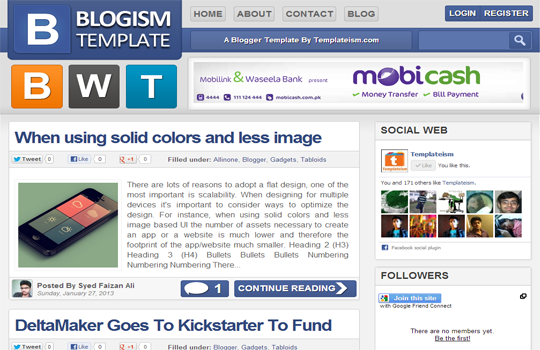
    Blogism Blogger Template 2013

    Blogism Blogger Template is design by a young Blogger Syed Faizan Ali (MBL Owner) from Pakistan,This Template is specially designed for Tech Bloggers .Blogism is ads ready template,it has One right sidebar and beautiful share buttons below the posts. Blogism Blogger Template has awesome header which makes it more beautiful Template.It has 2 columns layout.Blogism template has read-more option,it has author avatar with each post.This Template works with all type of Browsers such as Google Chrome,Mozilla Firefox and Internet Explorer etc.
    Template By Templatism
    Blogism Blogger Template Large Layout


    Big News Blogger Theme V2


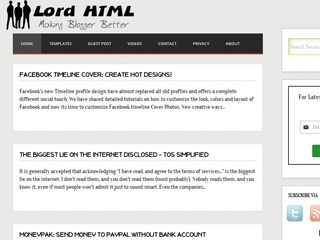
    Lord HTML Blogger Template

    Lord HTML Blogger Template is a new free Blogger Template design by Durai Sankar,its author is LORDHTML. Actually Lord HTML Blogger template is a clean and responsive Blogger template,it is also for Blogging and Tech blogs.However you can use it for any type of Blog.This template is ads,and SEO Optimized Template.It has no Footer,however it has one beautiful right sidebar along-with drop down menu which makes it attractive template.Moreover it has a search bar,page navigation widgets,social buttons,readmore option,and HTML Code View.This template works with all type of Browsers such as Google Chrome etc.You can Download it free from our Blog.
    Template design by Durai Sankar

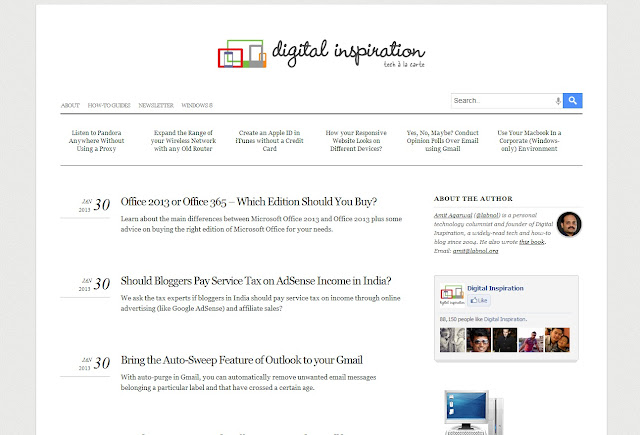
    Labnol Blogger Template

    Labnol Blogger Template is a Professional Blogger Template design by Labnol.Org.This template is designed by the Pro Blogger Of India,this template has many features such as Simple and Clean design,it has One right sidebar,This template is Purely SEO Optimized.The Loading Speed of this template is very fast.Labnol Blogger Template has white background which makes it more attractive template.However it works with all type of browsers such as Internet Explorer etc.You Can easily Download this template from Our Blog.
    Template design by Labnol
    labnol blogger template

    Sensational Blogger Template


    Spice Up Your Blog Template

    The last and most beautiful Blogger Template is Spice up Blogger Template which is designed by Durai Sankar.This Template is ads Ready template,it has awesome ads options.This template has 3 columns layout.It has ready Brown Color Drop Down menu.This template has Subscription widget and Own Fonts.This template has One Right Sidebar along with beautiful header which increase its beauty.This Template has ready Social Buttons which will surely help you to get more Facebook Page Likes,Twitter Tweets etc.However this template works with all type of browsers.You Can Download it free from Our Blog.
    Designed by Durai Sankar.
    Spice-up-your-blog-Blogger-Template


    Metro BTK V2 – Impressive Blogger Template

    metro BTK

    What's Up:-  These were some Professional Templates,which are really very fantastic,you can use it for any type of Blog,This templates are SEO Ready templates along with many features.Share your ideas with us,Stay Blessed Happy Blogging !

    Top 5 Cool WordPress Plugins 2013

    WordPress is a free Blogging Tool,WordPress is providing a huge amount of Plugins for their users,and it is extremely popular due to the availability of numerous plugins.Actually WordPress Provides alot of Plugins which can help you in increasing your Blog SEO(Search Engine Optimization),security,and other related functionality of WordPress Blogs.As in Blogger blogs the loading speed of blog get down by adding extra JavaScript widgets,likewise in WordPress installing many or extra Plugins to WordPress Blogs may down your Blog Loading Speed,and as a result you may lose your Blog Traffic.So be careful while installing any Plugin.However the Plugin we are going to Provide is simple and easy to install,these plugins will not effect your Blog Speed.
    image source highervisibility

    Top 5 Cool WordPress Plugins 2013

    If you are using WordPress and you don't have any one of the below Plugins installed,then you are forsaken by fortune,however these plugins are really awesome,you must install it in your WordPress Blog.The list of the Cool WordPress Plugins are Given below.

    WP-Biographia Plugin For WordPress

    Time to show your Biography to the audience of your Blog,this widget helps the Blogger to show his/her Information and Bio Data to the Visitors of Blog.Installing  Wp-Biographia will helps you to add a stylish and awesome author Bio box to every post and page of the blog.For installing this widget to your Blog Click the below green button.


    Comment Notifier Plugin for WordPress

    Whenever One leaves comment on your Blog Content,this Comment Notifier Plugin will Welcome him/her by sending a welcome Email.This is the best way to increase your Blog Traffic in a decent way.This Plugin Provides alot of option for customizing,you can customize it accordingly.You can set any text in welcoming your New Blog Commentor,Once you set the text then the Comment Notifier Plugin is responsible for sending the welcome email.

    Captcha,Another WordPress Plugin

    This Plugin is used when you have enabled the registration of users on your blog.The Question is Why when the registration is Enable?Because it installs modern Bots registers on your blog which automatically verify the email.For preventing the Spam registration,you surely need to install this Plugin in your Blog.So if you want to avoid spamming and if you are bore of spamming then must install this plugin on your Blog.

    Broken Link Checker Plugin For WordPress

    To err is human,some time we place a broken link mistakenly or something happens to the server of the link.These Broken links effect the SEO negatively and also this will made the readers unhappy.So if you want to avoid this issue,you must install this Plugin.Broken Link Checker Plugin Scan for Broken Links and where broken link is found it directly informs you.Then you can easily navigate the link and can modify it .

    Exclude Pages Plugin for WordPress

    Sometime due to personal issues or due to any solid reason we want to hide some pages from the navigation menu.Exclude Pages Plugin will helps you to hide any page you want.Actually this Plugin puts a check box in the sidebar of post section,now it provides you two options either you want to show the page in navigation menu or not,if yes it can be done just by single Click.

    So What's Up:- These were Top 5 Cool WordPress Plugins 2013,now share your beautiful ideas with us about these Plugins.Tell us which One you Like the most?How was the article?WordPress is Best or Blogging? Do You Like Blogger Widgets or WordPress Plugins? Stay Blessed,Happy Blogging.
    Top 5 Cool WordPress Plugins 2013
    Last Reviewed by Iftikhar uddinon June 24 2013
    Rating: 5

    Marinade à la grecque (pour poulet ou porc)

    Cette marinade saura à tout coup vous plaire et égayer vos papilles. La photo ne rend pas très bien (surtout pas le goût!) ce qu'elle représente vraiment, mais pour nous ici à la maison, ce fut un beau coup de coeur! Le poulet est encore meilleur réchauffé le lendemain en lunch et il est si tendre. Je vous la conseille vivement, surtout que la belle température ne semble pas vouloir nous quitter! J'ai déniché cette petite merveille chez Louloulaby.

    6 c. table d'épices club house à la grecque
    1/4 tasse eau
    1/4 tasse d'huile d'olive
    1/4 tasse jus de citron
    1/4 tasse mayonnaise
    1/4 tasse vinaigrette René's Ceasar (moi vinaigrette Ranch aux 3 fromages de Kraft)
    1 gousse d'ail finement hachée
    1 citron en fines rondelles

    Dans un bol, mélanger les ingrédients pour la marinade. Ajouter votre viande (poulet ou porc) et laisser mariner un minimum de 5 heures.

    Gâteau au fromage, à la lime et aux kiwis


    Chaque année, je me fais un plaisir de vous partager le dernier gâteau en date que j'ai réalisé pour la fête des mamans . Cette fois encore, je ne rate pas l'occasion et quel gâteau. Il demande bien quelques manipulations, mais si vous y allez étape par étape il sera très simple. De plus, si vous préparez tous vos ingrédients avant de commencer comme séparer les blancs des jaunes d'oeuf, zester vos limes et couper vos fruits, la recette n'en sera que plus accélérée. Sachez que vous aisément remplacer le mascarpone qui est $$ un peu dispendieux par du fromage à la crème. Vous pouvez également modifier les fruits selon vos goûts et vos envies. Ce gâteau dans tous les cas sera un vrai bouquet de fraîcheur par ces fruits bien juteux, son côté légèrement acidulé et sa croûte épicée, tous ont adoré, et en particulier ma maman chérie pour qui les gâteaux aux fruits et fromage sont ses préférés!

    Temps de préparation: 45 minutes
    Temps de cuisson: 10 minutes
    Temps de réfrigération: 5 à 6 heures
    Pour 8 à 10 portions:


    Croûte

    5 c. à soupe(75ml)de beurre fondu
    1 c. à soupe(15ml)de gelée d'abricots fondue
    3 tasses(750ml)de biscuits Graham grossièrement écrasés (si vous utilisez de la chapelure de biscuit Graham, 2 tasses suffiront)
    1/2 c. à thé(2ml)de cannelle moulue
    1 pincée de noix de muscade râpée

    Garniture

    6 kiwis
    Sucre, en quantité suffisante
    4 c. à thé(20ml)de gélatine neutre
    1/3 tasse(80ml)d'eau froide
    1 boîte de 796 ml(28 oz)de pêches en moitiés conservées dans le sirop
    4 oeufs, les jaunes et les blancs séparés
    Le zeste et le jus de 3 limes
    1 pincée de sel
    1 tasse(250ml)de crème à fouetter 35%
    1 tasse(250ml)de mascarpone(ou fromage à la crème)à la température ambiante (2 pqts si fromage à la crème)
    3 c. à soupe(45ml)de gelée d'abricots fondue


    Croûte

    Beurrer légèrement le fond d'un moule à fond amovible de 25 cm (10 po) de diamètre. Mélanger le beurre et la gelée d'abricots. Ajouter les biscuits Graham, la cannelle et la muscade, et bien mélanger. Presser la préparation au fond d'un moule en l'égalisant avec le dos d'une cuillère. Réserver au réfrigérateur.

    Garniture

    Couper 2 kiwis en petits dés. Couper le reste des kiwis en tranches. Mélanger les dés de kiwis avec 1 c. à soupe (15ml) de sucre. Chauffer au micro-ondes 2 minutes. Réserver. Entre-temps, faire gonfler la gélatine dans l'eau froide.

    Egoutter les pêches en réservant 6 c. à soupe(90ml)de sirop. Couper les pêches en tranches minces et réserver. Dans une petite casserole, faire chauffer le sirop à feu doux environ 2 minutes. Ajouter la gélatine gonflée et la faire dissoudre en brassant. Réserver.

    Sortir le moule du réfrigérateur et huiler très légèrement la paroi (pour ma part, j'ai beurré le moule au tout début légèrement). Couvrir la paroi du moule de tranches de kiwis et de pêches(réserver quelques trnaches pour la garniture). Remettre au réfrigérateur.

    Au bain-marie, monter les jaunes d'oeufs avec 160 ml(2/3 tasse) de sucre et le jus de lime à l'aide d'un fouet jusqu'à ce que le mélange soit épais et homogène. Ajouter le zeste de lime et mélanger.

    Au batteur électrique, monter les blancs d'oeufs en neige avec le sel. Au batteur électrique, fouetter la crème avec 60 ml (1/4 tasse) de sucre.

    Battre le mascarpone (ou fromage à la crème) en crème au batteur électrique. Ajouter le mélange de gélatine et les kiwis en dés, et mélanger. Incorporer successivement le mélange de jaunes d'oeufs, la crème fouettée et les blancs en neige, en pliant délicatement la préparation à l'aide d'une spatule.

    Verser la préparation dans le moule en prenant soin de ne pas déplacer les tranches de kiwis et de pêches, puis l'égaliser. Réfrigérer de 5 à 6 heures. Garnir le dessus du gâteau des tranches de fruits réservées et badigeonner de gelée d'abricots fondue. Réfrigérer 10 minutes avant de servir.

     
    Support :
    Copyright © 2011. Comment ça marche - All Rights Reserved